Five tries a day: the hidden limit on the extranjería cita previa portal
The cita previa portal stops showing you appointments after five submissions of your details from the same connection in one day, and it does not tell you: you see the same old "no hay citas disponibles". What counts, how to tell whether it is happening to you, and how to make the tries you have count.

One try, two tries, forty tries
Someone looking for an extranjería appointment by hand usually does it like this: open the cita previa portal, pick the province and the procedure, type in your NIE or passport number and your name, click accept and read "En este momento no hay citas disponibles". Then do it again. Ten times, twenty, forty in an afternoon. Almost nobody knows that from the sixth time onwards, the portal has stopped giving them a real answer.
We search for appointments on the official portal thousands of times a day, from many different connections, and compare what each one sees. In November 2026 the pattern is clear: a connection that has submitted its details five times in a day stops seeing appointments, and from then on the answer is always "no appointments available", whether there are any or not. The next day the same connection sees normally again.
What counts and what does not
Opening the portal does not count, nor does choosing the province, switching procedure or going back. What counts is the step where you enter your document number and your name and go on until the portal answers. Five of those submissions in one day from the same connection, and the answers stop being reliable.
The connection is your internet address, the one every device in your home shares through the same router. If you try three times from the laptop and your partner twice from their phone on the home wifi, all five are spent for both of you. On mobile networks it is common for many customers to share one address, so on mobile data you can find the counter already used up by strangers.
How to tell whether it is happening to you
The portal does not tell you, which is why this limit gets mistaken for scarcity. But the screen of a blocked connection is not the same as the screen of a day with no appointments, and you can tell them apart. There are five clues:
Look at the page you get back. When the portal really processes your search, the answer comes on the "Paso 1 de 5" screen, with the procedure's name, your name and document repeated under "Identidad del usuario de cita", and a "Salir" button. A blocked connection gets a different page: the heading "Información", no step and no procedure, no name, a "Cod. Oper." line with a long code, a date and a time, and a single "Aceptar" button. If the portal does not show your name back and stamps an operation code instead, it has not processed your search.
Count your submissions. If you have already sent your details five times today from this connection, whatever you see from now on is not information.
- Look at which version of the message you get. Sometimes the portal adds that it does have appointments available for people who identify with Cl@ve. In our checks, a blocked connection never receives that version: if you see it, the portal is giving you a real answer.
- Check against another source. Look at the availability data for your province, updated hourly. If our checks have found appointments for your procedure in the last few minutes and your screen says there are none, the screen is lying. Another connection (a friend in another house, a phone on mobile data instead of the wifi) also works as a cross-check.
- Wait until tomorrow. If first thing in the morning the same search, from the same connection, gives a different answer, yesterday was the block.
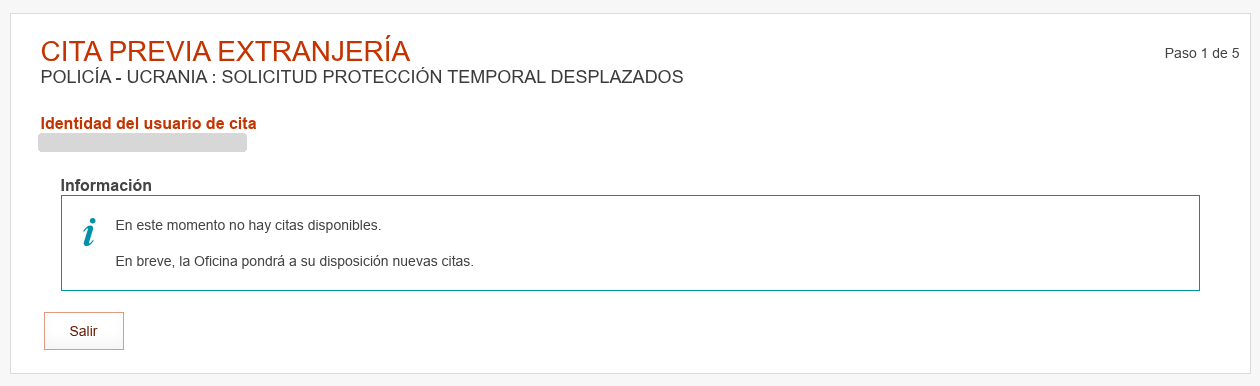
A real answer: "Paso 1 de 5", the procedure, your name and document, and "Salir". No appointments today, but the portal processed your search.
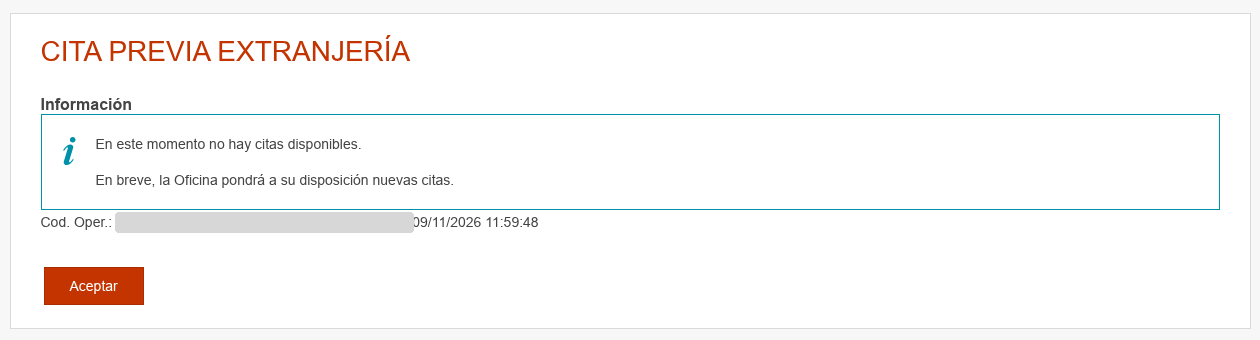
What a blocked connection sees: "Información", an operation code and "Aceptar". No step, no procedure, no name.
How to spend five tries well
Five tries a day is not so few if you do not throw them away. What changes is how you use them:
- Do not search blind. Before typing your NIE, check what time appointments appear in your province according to the data and save your tries for that window. A try at 9:00 in a province that releases at midday is a try thrown away.
- Get the procedure right first time. Picking the wrong procedure, going back and repeating with the right one is two submissions. Check which procedures your province handles before you start.
- Have your details ready. Your NIE or passport number, your name exactly as it appears on the document and your country of nationality, copied into a file. A typo that forces you to repeat costs a try. The guide to how to book fast when the appointment appears has the full list.
- Do not reload on the details screen. Reloading, or clicking accept twice because "it looks like it is not responding", is two submissions. Wait for the answer.
- Do not spend all five at the same hour. If your province's strong window is the morning, two tries mid-morning and one at the end of it are worth more than five in a row at 9:00.
Where Cita Ping comes in
We do the checks you cannot do: many a day, across the whole province, without spending your tries. If you create an alert for your province and procedure, you get a notification by email or Telegram when our checks detect available appointments, and then you spend one of your tries when you know there is something to see. You book it yourself on the official portal, free, as always. The service does not book for you and cannot guarantee you an appointment: appointments still disappear in minutes and you arrive with the same five tries as everyone else. What changes is that you use them with information.
What not to do
- Do not press "Aceptar" on the operation-code page hoping for another go. That page closes the pass; starting again from it is another submission with the same answer until tomorrow.
- Do not look for a free VPN to "get more tries". The portal rejects many of those addresses outright, and the ones it does not reject are usually already spent by other users of the same VPN.
- Do not buy an appointment. Resellers hoard appointments with bots that switch address automatically, precisely to dodge this limit; they are the cause of the shortage, not the solution. We explain how to tell a legitimate service from a reseller.
- Do not conclude there are "no appointments" because you have been seeing it for a week. If you make twenty tries every afternoon, you have spent a week reading the answer of a portal that stopped answering you at the sixth. Read what to do, step by step, when the portal says no and why there never seem to be any appointments.
Official sources
Featured guides


Citas appear without warning
We check every day from 07:30 (09:00 at weekends) to 22:00, Madrid time, and message you on Telegram or by email as soon as we spot one for your procedure.